Triggers and messages
All four plugins share one model of what a condition is and when it fires.
A trigger source is one condition
A trigger source is one experimental condition. TTL edges captured for it accumulate into its own average, its own spectra, its own direction of the map, and it is drawn in its own colour.
Sources are configured under the editor's TRIGGERS button.
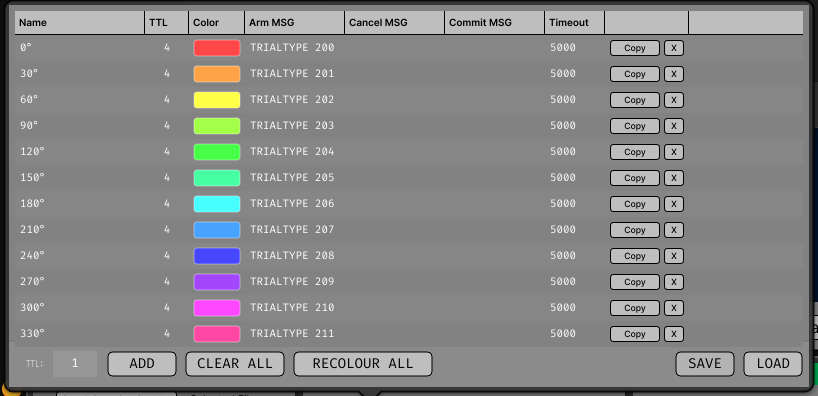
| Column | What it is |
|---|---|
| Name | The condition's label in the display. Cosmetic — nothing matches against it. |
| TTL | The TTL line whose rising edges fire this source. |
| Color | The colour it is drawn in. |
| Arm MSG | Message pattern that arms the source. Empty = the source is not gated and fires on every edge. |
| Cancel MSG | Pattern that disarms it, and throws away a capture still waiting to be committed. |
| Commit MSG | Pattern that folds a waiting capture into the accumulators. Empty = captures are accumulated immediately. |
| Timeout | Milliseconds a provisional capture is held before it is discarded. Default 5000. Zero disables expiry. |
The table is disabled during acquisition: adding or removing a source reallocates its accumulators.
The three patterns
Arm
A source with no arm pattern fires on every rising edge of its line, and MONITOR
shows it as live. Give it one and it fires only after an arming message, once per
arming, shown as armed / disarmed.
Commit and cancel
With a commit pattern set, the trial is captured on the TTL edge and then held in a per-source pending slot until one of three things happens:
- a commit message arrives, and it is folded into the accumulators;
- a cancel message arrives, and it is discarded;
- its timeout expires, and it is discarded.
That is how a trial can be rejected after the fact, on an outcome the task only knows about at trial end.
Parking a capture replaces whatever the source was already holding, so a trial that is never committed is evicted by the next one. The timeout (default 5000 ms) is the backstop for the last trial of a run. Set it too short and trials go missing — MONITOR names that case directly when commit messages match and nothing is kept.
How patterns match
Plain case-insensitive substring matches. No wildcards, no regular expressions, no alternation. An empty pattern is disabled rather than matching everything.
When one message matches both a cancel and a commit pattern, cancel wins. Arming is applied last and survives a cancel in the same message.
The usual recipe
Given a task that broadcasts ... TRIAL_START <n> ... and
... TRIAL_END <n> ... OUTCOME <code> ..., and keeping only outcome 0:
| Arm | Cancel | Commit |
|---|---|---|
TRIAL_START |
(empty) | OUTCOME 0 |
A trial end commits only on the wanted outcome. Any other outcome matches nothing, and that capture is evicted by the next trial's.
Note the trailing space in the commit pattern
Without it, OUTCOME 07 also matches OUTCOME 0. Substring matching has no notion
of a word boundary, so any pattern ending in a number needs its own boundary.
Do not cancel on the trial-start message
When the TTL pulse marks the trial start, a cancel pattern on the trial-start message discards every trial. The pulse reaches the plugin in microseconds; the message travels through the message centre and arrives a block or more later — i.e. after the capture it was supposed to protect.
Cancel patterns are for messages that either precede the trigger or report an outcome directly. Relying on eviction plus the timeout is otherwise simpler and correct.
Message-only triggering is not implemented
Broadcast messages arrive over HTTP and are unreliable in their timing, so a message-only
trigger cannot carry a trustworthy trigger sample. TriggerType::MSG_TRIGGER exists as an
extension point and is not offered in the UI
(#11).
Copying a trigger table between plugins
The TRIGGERS popup's SAVE and LOAD buttons move the whole table — names, TTL lines, colours, the three patterns and the timeout — as a small XML file, so a rig running several of these plugins off the same conditions types the patterns once.
LOAD also accepts a saved signal chain (.xml from the GUI), whose
CUSTOM_PARAMETERS block holds the same TRIGGERSOURCE elements. It:
- replaces the current table rather than merging into it;
- is disabled during acquisition;
- refuses a file with no trigger sources in it.
In the Bar Mapper the sweep angles and the direction generator's settings travel with the table.
What the file looks like
<TRIGGERSETTINGS plugin="Triggered Avg" savedAt="2026-08-24T14:31:07+0200">
  <TRIGGERSOURCE name="Attend in"
                 line="0"
                 type="1"
                 colour="ffe6b422"
                 armPattern="TRIALTYPE 200 TIMESEQUENCE"
                 cancelPattern=""
                 commitPattern="OUTCOME 0 "
                 pendingTimeoutMs="5000"/>
  <TRIGGERSOURCE name="Attend out" line="0" type="1" colour="ff3f9ad9"
                 armPattern="TRIALTYPE 201 TIMESEQUENCE"
                 cancelPattern="" commitPattern="OUTCOME 0 "
                 pendingTimeoutMs="5000"/>
</TRIGGERSETTINGS>
The same TRIGGERSOURCE elements appear in a saved signal chain and in a saved
session's session.xml, which is why all three are interchangeable as LOAD input.
MONITOR
The MONITOR popup shows what is actually happening.
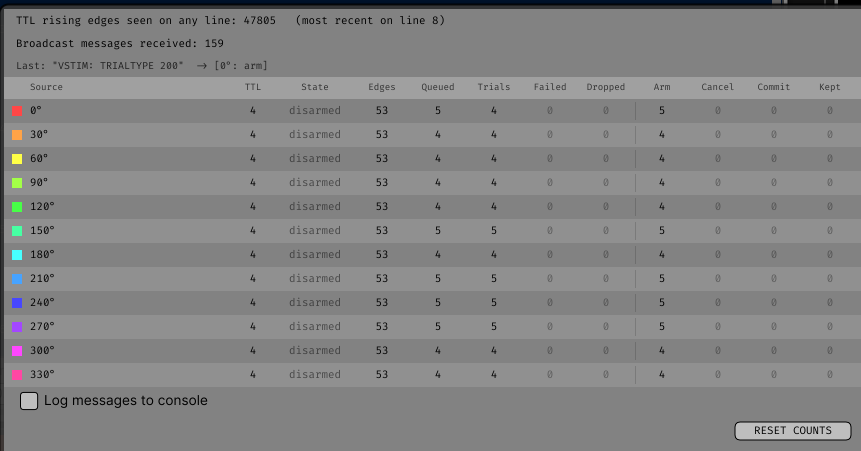
| Counter | Counts |
|---|---|
EDGES |
Rising edges on this source's line, counted before the arm gate |
QUEUED |
Edges that passed the gate and were handed to the worker |
DROPPED |
Edges dropped because the work queue was full |
CAPTURED |
Trial windows the worker extracted and transformed |
FAILED |
Windows the worker gave up on — too old, or the stream stopped advancing |
COMMITTED |
Parked captures folded in by a commit message |
ARM / CANCEL / COMMIT |
Messages that matched each pattern |
The message counters count matches, not actions taken: a message hitting both a cancel and a commit pattern increments both, while only the cancel takes effect.
Alongside them: the TTL and broadcast-message totals, the text of the last message, a console-echo toggle, and a one-line diagnosis of the commonest failures.
Which parameters are locked during acquisition
Anything that reshapes the accumulators, because changing it discards what has been collected:
- the channel selection,
PreandPost, in every plugin; - the trigger table itself — adding, removing or loading sources;
- each plugin's own analysis parameters (Triggered Average's
Max Trials, all of the spectral estimator settings, Coherence's shift predictor).
Anything that only changes how accumulated data is drawn stays live: axis limits, colour maps, grid layout, Triggered Power's baseline and whitening, Coherence's display mode and smoothing, and every parameter of the Bar Mapper except the capture window. See the Parameter reference.